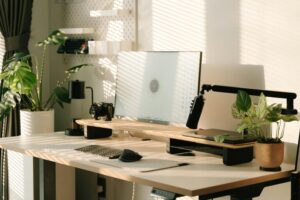

Setting up and organizing your home office effectively can make a big difference in how productive and comfortable you feel throughout your workday. When your workspace is clutter-free and thoughtfully arranged, you can focus better, reduce stress, and even improve your posture and well-being. Whether you’re new to working remotely or simply looking to refresh your current setup, these tips will help you transform your home office into an efficient and inviting place to work.
Choose the Right Space
Find a Dedicated Area
If possible, select a designated corner or room for your office. A dedicated space helps separate work from personal life, making it easier to focus during work hours and relax afterward.
Consider Natural Light
Natural light can boost your mood and energy. Position your desk near a window to take advantage of sunlight, but avoid glare on your computer screen.
Invest in Comfortable Furniture
Ergonomic Chair
A supportive chair that encourages good posture is essential. Look for adjustable options that provide lumbar support to avoid back strain.
Suitable Desk Height
Your desk should be at a comfortable height so your arms rest naturally while typing. Adjustable desks are a great option if you want the flexibility to sit or stand.
Organize Your Desk Efficiently
Keep Essentials Within Reach
Arrange frequently used items like pens, notepads, and your computer close at hand to minimize distractions.
Use Desk Organizers
Trays, pen holders, and file stands help keep supplies in order. They reduce clutter and make your workspace look neat.
Limit Decor
Keep decorations simple and meaningful. Too many items can create distractions, but a plant or a family photo can make the space feel welcoming.
Declutter Regularly
Sort and Purge
Set aside time weekly or monthly to clear out old papers, receipts, or unused items.
Digitize Documents
Scan important documents and store them on your computer or cloud storage to reduce physical clutter.
Utilize Storage Solutions
Shelving Units
Install shelves to keep books, binders, and decorative items organized and off your desk surface.
Drawer Dividers
Use dividers to separate office supplies and keep drawers tidy.
Filing Cabinets or Boxes
Organize important documents in labeled folders for easy access.
Manage Cables and Electronics
Cable Organizers
Use clips, sleeves, or cable boxes to keep cords tidy and prevent tangling.
Wireless Accessories
Consider wireless keyboards, mice, and printers to reduce cable clutter.
Create a Comfortable Atmosphere
Adjust Lighting
Use desk lamps with adjustable brightness to reduce eye strain, especially for late work sessions.
Control Temperature
Make sure your office has proper ventilation and a comfortable temperature to stay focused.
Personalize Thoughtfully
Add a few personal touches, like artwork or a scented candle, to make your workspace enjoyable without causing distraction.
Plan Your Time and Tasks
Use a Planner or Calendar
Keep track of deadlines and schedule breaks to help maintain productivity.
Set Daily Goals
Start each day by listing your most important tasks. A clear plan helps you stay on track.
Incorporate Movement
Take Breaks
Stand up, stretch, or take short walks during your workday to refresh your mind and body.
Consider a Sitting/Standing Desk
Alternating between sitting and standing can improve comfort and energy levels.
—
Organizing your home office is not just about tidiness; it’s about creating a space that supports your best work and well-being. By making thoughtful choices in how you arrange and maintain your workspace, you can enjoy a more productive, comfortable, and pleasant work-from-home experience. Start with these tips and adjust your setup over time to find what works best for you.